~~ EKPHOS ~~
** AN OBSIDIAN ALTERNATIVE **
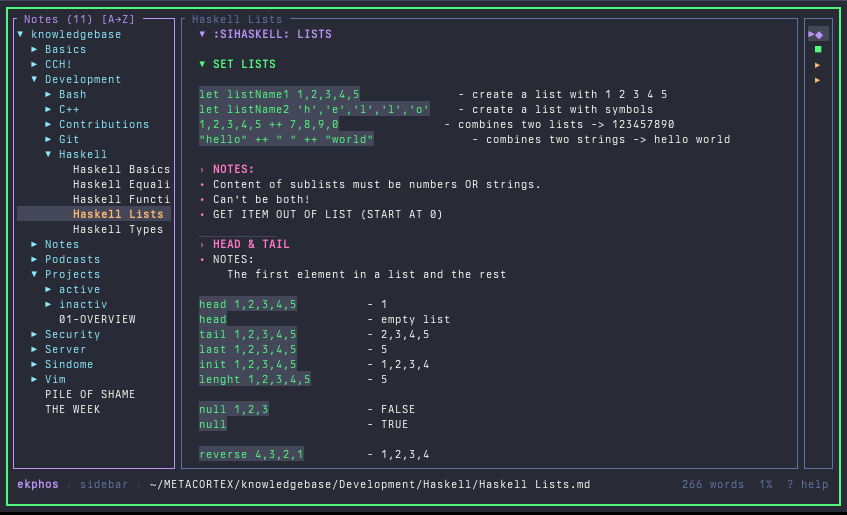
The entire nerd community is talking about and using Obsidian as a knowledge base or for managing notes. Yes, Obsidian is a powerful tool with a multitude of plugins and functions that cover all possible scenarios. I’ve also been using Obsidian for about a year now – time to say goodbye.
KNOWLEDGE MANAGEMENT
As mentioned above, Obsidian offers a virtually endless list of plugins, functions, and extensions. These may have their place, because they wouldn’t exist otherwise. However, this kind of proliferation can quickly become excessive and inflate a tool to the point where it tries to be the solution for problems that could be solved more easily with other tools. In my experience, Obsidian always felt too large for its intended purpose. I would define that purpose as follows: I have a directory with categorized subfolders containing Markdown files. The .md files contain various notes, code examples, documentation, and even my homelab infrastructure and its nodes. This means I need a file tree and a rendered Markdown view.
Plugins like icons, custom colors, status bar adjustments, etc., were nice extras in my case—but not essential.
I didn’t use Obsidian’s paid sync service because I find it rather strange to store my notes on external servers. The good news is there are alternatives, and that’s where EKPHOS came in.
EKPHOS
EKPHOS is a Rust-based tool that perfectly meets my needs. Firstly, Ekphos is terminal-based, making it ideal for keyboard-centric workflows. Secondly, Ekphos uses Vim keybindings, which makes navigation intuitive from the start. The tool displays the file tree on the left, the rendered Markdown or the file being edited in the middle window, and the file structure on the right. On top of that, you can write your own themes – I added Dracula, and the maintainer even merged it directly into the current version. Ekphos does have a few limitations, though; for example, it’s currently not possible to link within the knowledge base. That’s fine for me, but it might be a deal-breaker for some.
INSTALLATION
The tool itself is still quite new and in a very early stage of development. Therefore, it unfortunately doesn’t yet appear in the nixpkgs. But that’s okay. We’ll build the whole thing via overlay (fortunately, Cargo.lock and Cargo.toml are now in the repository, so we don’t need to build them ourselves):
In our /etc/nixos/ we have the two subfolders /overlays and /pkgs/ekphos.
/overlays
In overlays we find our ekphos.nix with the following content:
1self: super: {
2    ekphos = super.callPackage ../pkgs/ekphos { };
3}
/pkgs/ekphos
Here you will find the Cargo.lock and Cargo.toml from the project and our default.nix:
 1{ lib
 2  , fetchFromGitHub
 3  , rustPlattform
 4};
 5
 6rustPlattform.buildRustPackage rec {
 7    pname = "ekphos";
 8    version = "0.15.0";
 9
10    src = fetchFromGithub {
11        owner = "hanebox";
12        repo = "ekphos";
13        rev = "v${version}";
14        sha256 = "sha256=XXXXXXXXXXXXXXXXXXXXXXXXXXXXXXXXXX",
15    };
16
17    postPatch = ''
18        cp ${.Cargo.lock} Cargo.lock
19        '';
20        cargoLock.lockFile = ./Cargo.lock;
21        cargoBuildFlags = [ "--locked" ];
22
23    meta = with lib; {
24        description = "Terminal-based markdown research tool";
25        homepage = "https://github.com/hanebox/ekphos";
26        license = licenses.mit;
27        platforms = platforms.linux;
28    };
29}
configuration.nix
Of course, we still need the reference in our main configuration (or somewhere else in the config which is being built):
1nixpkgs.overlays = [
2    (import ./overlays/ekphos.nix)
3];
Then, a rebuild is performed using the nixos-rebuild switch and Ekphos should be executable.
I’ll discuss overlays in more detail later, as they offer wonderful opportunities to integrate packages outside of nixpkgs.
Back to the actual tool.
CONTROLS
Ekphos is controlled entirely via keyboard.
Currently, the keybindings are as follows:
GLOBAL
 1j/k         -- up/down
 2Tab         -- switch focus
 3Shift + Tab -- switch focus (reverse)
 4Enter/o     -- Open
 5?           -- help
 6q           -- quit
 7CTRL + b    -- toogle sidebar
 8CTRL + o    -- toogle outline
 9CTRL + f    -- find in buffer
10CTRL + z    -- toogle zen mode
11R           -- Reload files from disk
12CTRL + SH + R -- Reload Config
SIDEBAR
1n       -- Create new note
2N       -- Create new Folder
3Enter   -- Toggle Folder
4r       -- rename
5d       -- delete
6e       -- edit note
7/       -- Search notes
CONTENT VIEW
1j/k          -- Navigate
2Shift + j/k  -- Toggle floating cursor
3gg           -- go to begin
4G            -- go to end
5Space        -- toggle task / open link
6] / [        -- next / prev link
7za           -- toggle heading fold
8zM           -- fold all headings
9zR           -- unfold all headings
In the notes’ edit mode, the standard Vim keybindings are available for editing the notes. You can display all keybindings by typing ?.
SYNC
One of Obsidian’s main features is (paid) syncing across different devices. Because Ekphos is based on a folder containing Markdown files, this folder can be easily distributed to other devices, for example, via Nextcload. You can either work locally in your folder and move everything to the shared storage when you’re finished, or you can work live in the shared folder. On the other devices, you can either work with Ekphos again or use one of the numerous Markdown viewers available for your device.
FAZIT
Ekphos is currently a viable replacement for Obsidian and works flawlessly in the terminal. Ekphos offers functionalities that competitors like glow, for example, lack. The tool has a lot of potential and welcomes contributors to continuously expand its scope. So, if you’re proficient in Rust, contribute to its growth, and soon Ekphos will be exactly the Obsidian alternative that terminal enthusiasts need.
Happy Hacking!
[~] BACK